Superwall
A paywall builder and testing platform that lets apps design and A/B test subscription paywalls.
Superwall's lead designer Jonathan Parra has built about 4,500 paywalls and found no template wins across apps. A simplified paywall with a plain Continue button beat a table paywall by 111%, and a cleaner footer won by about 10%. Lesson: test layout and packaging simplicity first, start from a bullet-list baseline, and show hard or soft paywalls by traffic source.
- 3, 6 and 12 month plans
- Struck-through prices
- Comparison chart
- "Try [app] for 50% off" headline
- Large app visual
- Big Continue button
Big visual paywall won by 111%
From Jonathan Parra, Superwall lead designer
What was said about Superwall
1Why no paywall template wins everywhere
No paywall transfers unchanged between apps, even within one category. Jonathan Parra, Superwall's lead designer, has built about 4,500 paywalls by hand for customers. He set out to find a golden set anyone could copy, and found that the same paywall can do well in one app and flounder in another of the same category.
His answer is a component system: parts that tend to work, dropped into each paywall and still tested per app. His results are single examples from one designer, with no sample sizes, significance or app names. "There is no perfect paywall."
Start from a one-page bullet list paywall and test variants against it. His first paywall for most customers has a heading with the USP, a few bullets of what the user gets, social proof and a large Continue button. It is one of the few designs that performs well across categories.
Variants then add a video, an image, more social proof pages or a table, and are compared to this baseline.
A native SwiftUI-style paywall can beat custom designs in native-looking apps. For Pyometer Plus+, a paywall in Apple's SwiftUI style outperformed every custom variant "by quite a long shot", and the same style worked again in a second app.
The likely reason is that it matches what users already expect. Keep some brand flair, as Snapchat does, rather than the default blue.
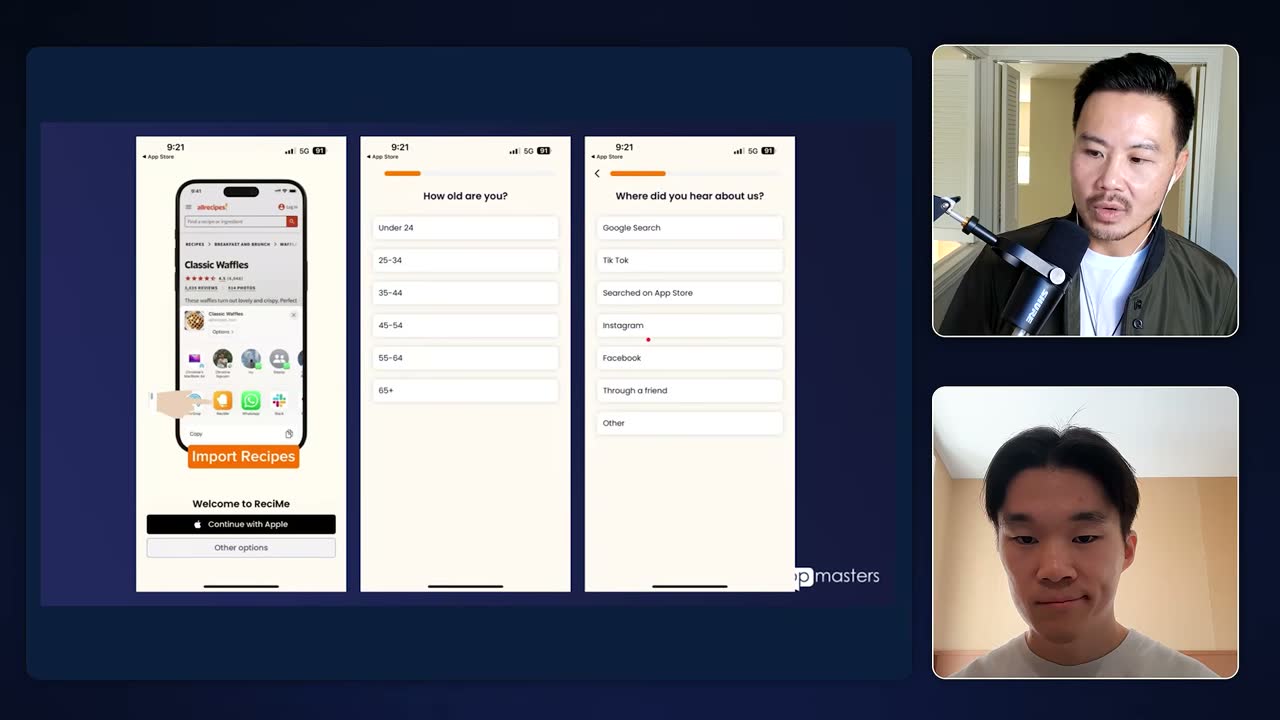
ReciMe onboarding screens asking age and "Where did you hear about us?" to route users to different paywalls. Test design and packaging before price points. Most paywall mistakes sit in how plans are packaged, usually in the footer, so design and packaging tests move conversion more than price tests.
Price tests need users split into fixed cohorts, which adds audience management overhead and slows testing, so they come later. Parra says most founders obsess over price instead.
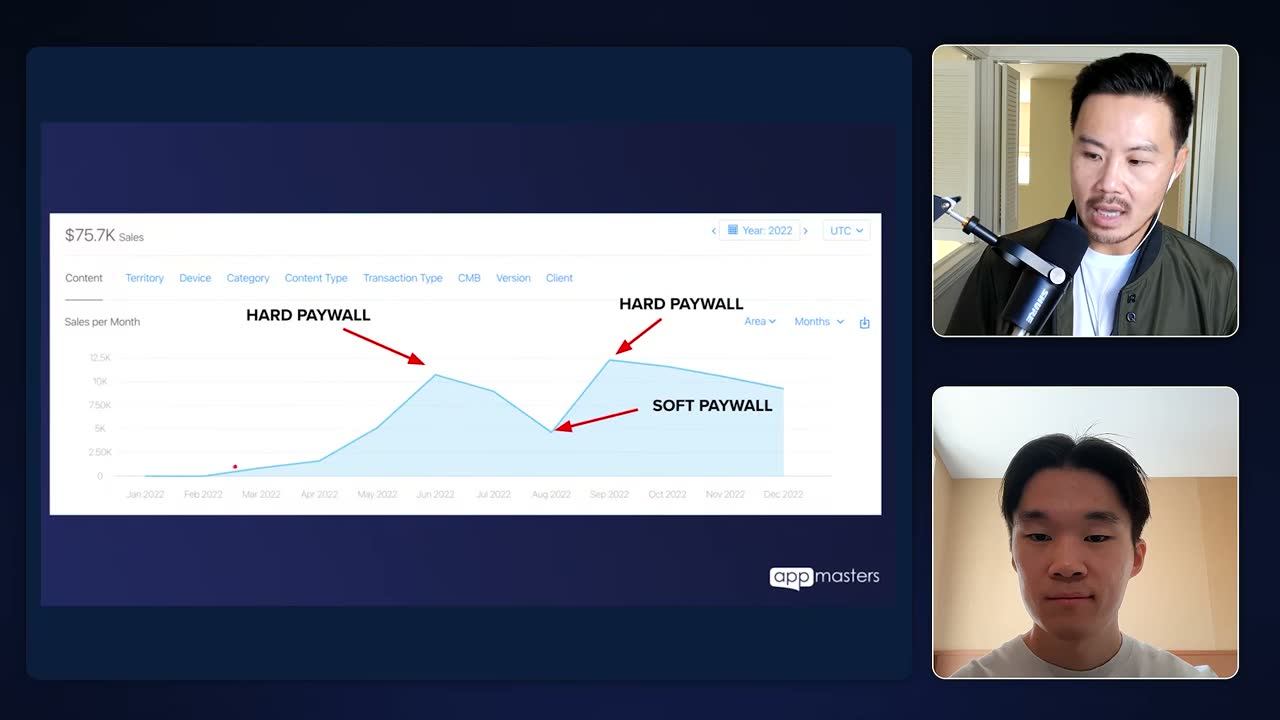
2022 monthly sales chart ($75.7K total): hard paywall lifts revenue past $10K, soft paywall dips it. Testing pays most for apps that have never tested. Apps near $100K a month with little testing see the biggest gains, since the first test usually pays back immediately. Newer apps at $10K to $50K a month can move conversion from about 8%, the average he sees, to 15 to 20% after a few iterations.
The lift comes without extra ad spend or product investment.
2The footer and copy tests: less to read converts better
A cleaned-up footer beat a cluttered control by about 10%. The control listed weekly, annual and monthly with repetitive labels like "AI assistant weekly" and a "Put AI into action" button. The variant led with annual, centered a "70% off" badge, added a "No commitment, cancel anytime" line and used a plain Continue button, and won by about 10%.
Parra credits the cleaner product group more than the button for the gain. The "limited time" text was too small to work and belongs in the heading of a one-time-offer paywall instead. Plain Continue "lets the user gently go down that funnel".
A big app image and plain Continue beat a comparison table by 111%. The losing paywall packed in 3, 6 and 12 month plans, struck-through prices and a comparison chart. The winner used a headline like "We want you to try [app] for 50% off", a large visual of the app and a big button, lifting conversion 111%.
The 50% off framing was borrowed from Cali. Any table component he has used underperformed simple bullets, a video or a visual cue. He makes the button about 65 points tall, sometimes 56, and uses "Start my 3-day trial" when a trial is selected.
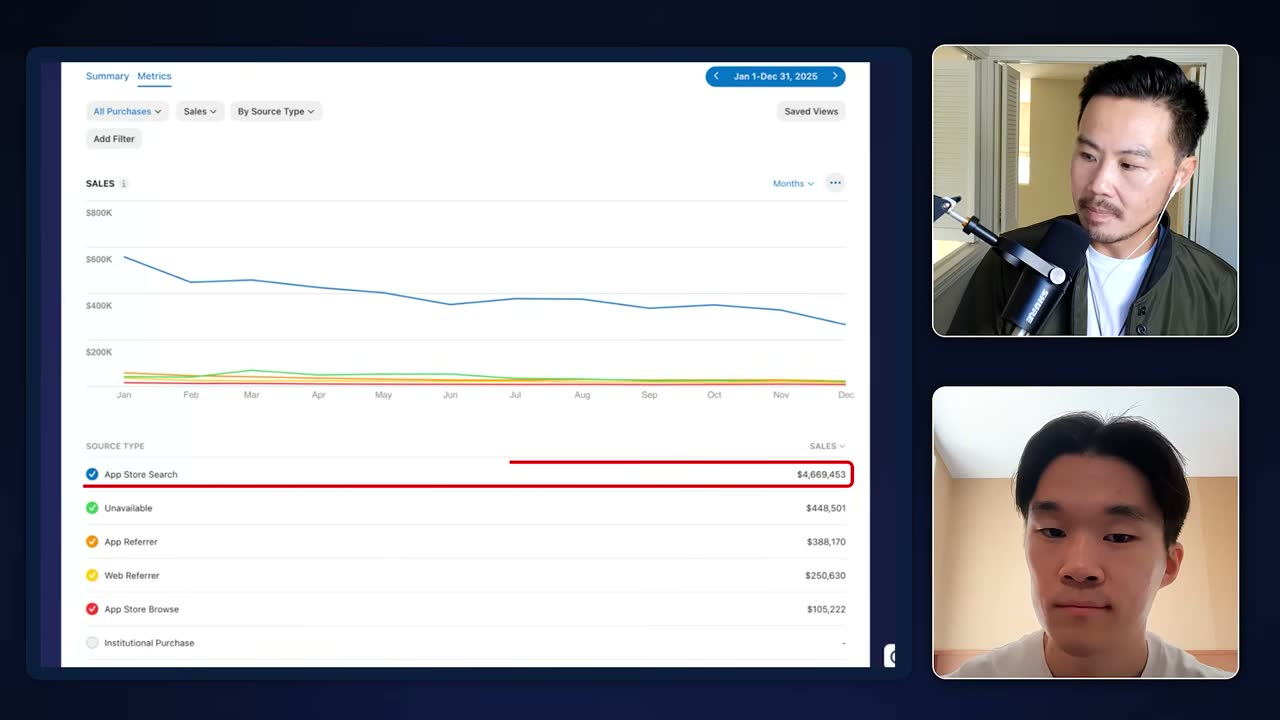
App Store Connect sales for 2025: App Store Search drove $4,669,453, dwarfing other sources. Put "No commitment, cancel anytime" under the button on almost every paywall. Parra adds the line to nearly every paywall he designs as a free, small lift in conversion. It was part of both the 10% footer winner and the 111% winner.
The bump is described but never measured on its own.
A phone-in-hand video of the app in action won a test. He records the app on a phone and drops it into Rotato to make a keyframed video, paired with social proof and simple bullets. The format won a test and was inspired by Mojo, who use it heavily.
Components like the video, a slider or text are swapped between variants, with copy aimed at the demographic.
Transformation apps should show a timeline that makes the user the hero. If the product takes users through a multi-day or multi-week journey, show timeline steps of who they become. Blinkist's free trial timeline paywall has been used for years and still performs very well.
Apps with a clear USP and a before-and-after feedback loop convert well with this "hero's journey funnel", in the style of Clear 30.
A dark premium background on the higher tier pushed more users to Pro. On Plus and Pro paywalls, switching to a contrasting dark look when Pro is selected got more users to subscribe to Pro.
The design was inspired by Hinge. The contrast after a white onboarding signals that something different is happening.
3Plan packaging, trials and exit offers
Fewer visible plans plus a named trial lifted conversion sharply. Dropping monthly to show annual and weekly, with the button reading "Start my 3-day trial", produced a dramatic increase over a three-plan layout with no trial. Annual stayed preselected because it had the highest LTV and ARPU for that customer.
Other plans can sit behind a "view all plans" button, since showing everything causes decision fatigue. Plans should run in order of length, never weekly, annual, monthly.
Weekly plans let hesitant users in and often earn more than annual. Weekly spread with AI wrapper apps: users skip a year's commitment and many forget to cancel, paying more than annual would cost. Weekly also lets price tests find willingness to pay.
Social and multiplayer apps now favor weekly and monthly, so test annual plus weekly against annual plus monthly. About half of trial users cancel after subscribing, but the app still gets to show its product.
Turn each paywall close into a reframed offer, then a small discount. Closing the paywall opens a drawer saying "not ready to commit for a year", keeping yearly selected with monthly as fallback and showing $39 a year as 76 cents a week. A second refusal triggers a one-time offer that drops yearly from $40 to $30.
Discounts stay at 25% to 33% so big sales are saved for Black Friday and Cyber Monday and the brand is not cheapened, especially for larger apps. Steve Young adapted a similar two-paywall idea from Jake Moore: normal paywall first, discounted one with urgency after the X, since most people buy during onboarding.
A high share of monthly and weekly buyers signals weak onboarding. Weekly and monthly buyers are usually unsure the product will work for them, so many monthly customers suggests onboarding did not show the product well. Default to annual, which usually has the highest LTV.
A trial versus no-trial test diagnoses onboarding and product stickiness. For low inference cost products, offering a free trial shows whether users will pay before trying and at what price. High churn despite good onboarding completion points to the product itself.
Niche AI apps with tuned prompts can charge well above $40 a year. One chat app charges about $20 to $22 a month because its prompt is personalized to its niche, and a health app launched two to three years ago still earns steady revenue despite ChatGPT and Claude.
Insecurity-driven niches charge the most, such as Looks Max apps and dating apps that read text screenshots and suggest replies. Text-only AI wrappers settled near $30 to $40 a year by copying each other; image and video apps charge more.
A friends and family plan can raise ARPU and LTV. For multiplayer or shareable apps, for example through iCloud family, many users pick a shared tier over the one-person annual plan.
It needs extra implementation and Apple SDKs, which is why few apps offer it.
4Superwall's plan count data
Two plans beat one by 61%, and three beat two by 44%. Superwall data, cited from Jake Moore, showed a 61% lift for two plans over one and a further 44% lift for three over two. Steve Young leans toward three every time: a cheap plan, the ideal high LTV plan, and a decoy.
Three plans can lower LTV, so steer people to yearly and give only the yearly plan a trial. Adapty has a similar report. Parra, by contrast, often shows two plans and hides the rest behind "view all plans".
5Jake Moore's rules on paywall views
Get the paywall view rate above 80% in the first session. Superwall founder Jake Moore sets this target: users who never see the paywall don't know a premium product exists, so conversion suffers.
Streamlined registration with Apple, Facebook and Google sign-in helps more users reach it.
More paywall views make more money, so show it more than once. Moore calls more paywall views a best practice and says two views is optimal, in the order paywall, onboarding, paywall. Genie, an app making $200K a month, shows the paywall again on the second app open.
Steve Young checks every app he audits by opening it a second time, and prefers a paywall followed by a discounted paywall. Moore also warns that hard paywalls can lower LTV.
6Hard paywall for paid traffic, soft for organic
Paid users get a hard paywall; organic users keep the X. A Superwall integration from AppStack's Lucas asked "where did you hear about us" in onboarding, removed the close button for Instagram and Facebook users and kept a soft paywall for App Store search and word of mouth. It showed a clearly better start-trial rate and performed a lot better for one app.
The question backs up attribution. Keeping the X for organic users limits one-star reviews, while paid users cost money, so they pay or leave.
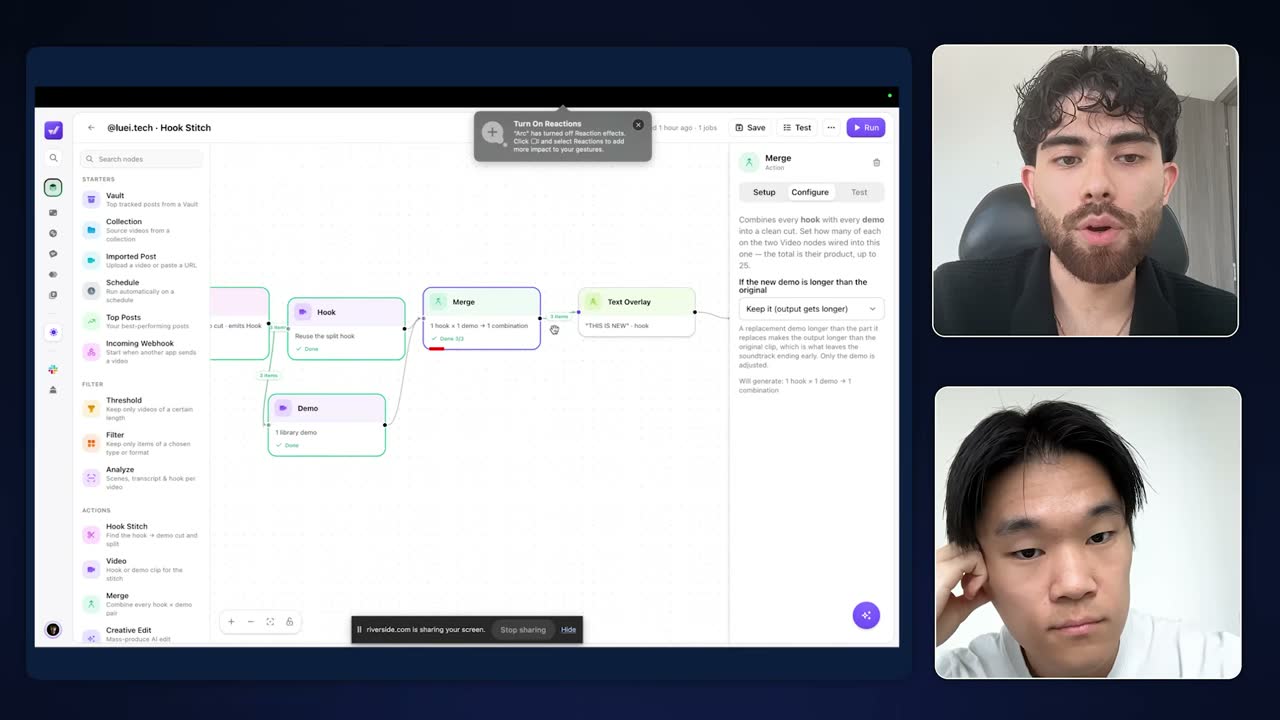
Hook Stitch workflow merging one hook with one library demo, then adding a "THIS IS NEW" text overlay.
7Superwall in the wider app stack
Check LTV per install in your paywall tool before spending on Meta. Superwall, like RevenueCat and Adapty, shows LTV per install, which should reach about $3 before running Meta ads because Meta installs can cost $1 to $2.
Measure around month 11, since LTV can be much higher than at month one. Apple Ads can work with a lower figure.
Superwall data also feeds UGC attribution tools. SideShift connects Superwall, RevenueCat and Stripe to attribute revenue to organic UGC videos. Clover counts Superwall among the customers it drives organic views for.
Founder Jake's Natural camera app was used as a cloning demo.
I made 4,000 app paywalls and learned this
Lead designer Jonathan Parra has built about 4,500 paywalls by hand there, and found no template wins across apps. A simplified footer beat a cluttered control by about 10%, and a plain bullet-list paywall is his baseline.
Check LTV per install in your paywall tool before spending on Meta. Superwall, like RevenueCat and Adapty, shows LTV per install, which should reach about $3 before running Meta ads because Meta installs can cost $1 to $2.
Measure around month 11, since LTV can be much higher than at month one. Apple Ads can work with a lower figure.

Before You Spend $1 on Meta Ads, Watch This
Superwall is named alongside RevenueCat and Adapty as a place to find LTV per install, which should reach about $3 before Meta spend.
Superwall data also feeds UGC attribution tools. SideShift connects Superwall, RevenueCat and Stripe to attribute revenue to organic UGC videos. Clover counts Superwall among the customers it drives organic views for.
Founder Jake's Natural camera app was used as a cloning demo.
The NEW App Content Strategy Dominating in 2026
Named as one of the customers Clover drives organic views for. Its founder Jake built the Natural camera app used as a cloning demo.
Paid users get a hard paywall; organic users keep the X. A Superwall integration from AppStack's Lucas asked "where did you hear about us" in onboarding, removed the close button for Instagram and Facebook users and kept a soft paywall for App Store search and word of mouth. It showed a clearly better start-trial rate and performed a lot better for one app.
The question backs up attribution. Keeping the X for organic users limits one-star reviews, while paid users cost money, so they pay or leave.
Hook Stitch workflow merging one hook with one library demo, then adding a "THIS IS NEW" text overlay.
We’ve Tested 100s of Paywalls. Here’s What Actually Converts.
A Superwall test showed a hard paywall to Meta ad users and a soft one to organic users. The hard paywall had a clearly better start-trial rate.
Superwall data also feeds UGC attribution tools. SideShift connects Superwall, RevenueCat and Stripe to attribute revenue to organic UGC videos. Clover counts Superwall among the customers it drives organic views for.
Founder Jake's Natural camera app was used as a cloning demo.
#1 UGC EXPERT Reveals How To Market Consumer Apps
SideShift connects Superwall, along with RevenueCat and Stripe, to attribute revenue to organic UGC videos.
Paid users get a hard paywall; organic users keep the X. A Superwall integration from AppStack's Lucas asked "where did you hear about us" in onboarding, removed the close button for Instagram and Facebook users and kept a soft paywall for App Store search and word of mouth. It showed a clearly better start-trial rate and performed a lot better for one app.
The question backs up attribution. Keeping the X for organic users limits one-star reviews, while paid users cost money, so they pay or leave.
Hook Stitch workflow merging one hook with one library demo, then adding a "THIS IS NEW" text overlay.
Beginners Guide to Buying & Selling Apps 2026
Lucas from AppStack shared a Superwall integration that showed soft or hard paywalls by traffic source and performed a lot better for one app.
No paywall transfers unchanged between apps, even within one category. Jonathan Parra, Superwall's lead designer, has built about 4,500 paywalls by hand for customers. He set out to find a golden set anyone could copy, and found that the same paywall can do well in one app and flounder in another of the same category.
His answer is a component system: parts that tend to work, dropped into each paywall and still tested per app. His results are single examples from one designer, with no sample sizes, significance or app names. "There is no perfect paywall."
Start from a one-page bullet list paywall and test variants against it. His first paywall for most customers has a heading with the USP, a few bullets of what the user gets, social proof and a large Continue button. It is one of the few designs that performs well across categories.
Variants then add a video, an image, more social proof pages or a table, and are compared to this baseline.
A native SwiftUI-style paywall can beat custom designs in native-looking apps. For Pyometer Plus+, a paywall in Apple's SwiftUI style outperformed every custom variant "by quite a long shot", and the same style worked again in a second app.
The likely reason is that it matches what users already expect. Keep some brand flair, as Snapchat does, rather than the default blue.
ReciMe onboarding screens asking age and "Where did you hear about us?" to route users to different paywalls. Test design and packaging before price points. Most paywall mistakes sit in how plans are packaged, usually in the footer, so design and packaging tests move conversion more than price tests.
Price tests need users split into fixed cohorts, which adds audience management overhead and slows testing, so they come later. Parra says most founders obsess over price instead.
2022 monthly sales chart ($75.7K total): hard paywall lifts revenue past $10K, soft paywall dips it. Testing pays most for apps that have never tested. Apps near $100K a month with little testing see the biggest gains, since the first test usually pays back immediately. Newer apps at $10K to $50K a month can move conversion from about 8%, the average he sees, to 15 to 20% after a few iterations.
The lift comes without extra ad spend or product investment.
A cleaned-up footer beat a cluttered control by about 10%. The control listed weekly, annual and monthly with repetitive labels like "AI assistant weekly" and a "Put AI into action" button. The variant led with annual, centered a "70% off" badge, added a "No commitment, cancel anytime" line and used a plain Continue button, and won by about 10%.
Parra credits the cleaner product group more than the button for the gain. The "limited time" text was too small to work and belongs in the heading of a one-time-offer paywall instead. Plain Continue "lets the user gently go down that funnel".
A big app image and plain Continue beat a comparison table by 111%. The losing paywall packed in 3, 6 and 12 month plans, struck-through prices and a comparison chart. The winner used a headline like "We want you to try [app] for 50% off", a large visual of the app and a big button, lifting conversion 111%.
The 50% off framing was borrowed from Cali. Any table component he has used underperformed simple bullets, a video or a visual cue. He makes the button about 65 points tall, sometimes 56, and uses "Start my 3-day trial" when a trial is selected.
App Store Connect sales for 2025: App Store Search drove $4,669,453, dwarfing other sources. Put "No commitment, cancel anytime" under the button on almost every paywall. Parra adds the line to nearly every paywall he designs as a free, small lift in conversion. It was part of both the 10% footer winner and the 111% winner.
The bump is described but never measured on its own.
A phone-in-hand video of the app in action won a test. He records the app on a phone and drops it into Rotato to make a keyframed video, paired with social proof and simple bullets. The format won a test and was inspired by Mojo, who use it heavily.
Components like the video, a slider or text are swapped between variants, with copy aimed at the demographic.
Transformation apps should show a timeline that makes the user the hero. If the product takes users through a multi-day or multi-week journey, show timeline steps of who they become. Blinkist's free trial timeline paywall has been used for years and still performs very well.
Apps with a clear USP and a before-and-after feedback loop convert well with this "hero's journey funnel", in the style of Clear 30.
A dark premium background on the higher tier pushed more users to Pro. On Plus and Pro paywalls, switching to a contrasting dark look when Pro is selected got more users to subscribe to Pro.
The design was inspired by Hinge. The contrast after a white onboarding signals that something different is happening.
Fewer visible plans plus a named trial lifted conversion sharply. Dropping monthly to show annual and weekly, with the button reading "Start my 3-day trial", produced a dramatic increase over a three-plan layout with no trial. Annual stayed preselected because it had the highest LTV and ARPU for that customer.
Other plans can sit behind a "view all plans" button, since showing everything causes decision fatigue. Plans should run in order of length, never weekly, annual, monthly.
Weekly plans let hesitant users in and often earn more than annual. Weekly spread with AI wrapper apps: users skip a year's commitment and many forget to cancel, paying more than annual would cost. Weekly also lets price tests find willingness to pay.
Social and multiplayer apps now favor weekly and monthly, so test annual plus weekly against annual plus monthly. About half of trial users cancel after subscribing, but the app still gets to show its product.
Turn each paywall close into a reframed offer, then a small discount. Closing the paywall opens a drawer saying "not ready to commit for a year", keeping yearly selected with monthly as fallback and showing $39 a year as 76 cents a week. A second refusal triggers a one-time offer that drops yearly from $40 to $30.
Discounts stay at 25% to 33% so big sales are saved for Black Friday and Cyber Monday and the brand is not cheapened, especially for larger apps. Steve Young adapted a similar two-paywall idea from Jake Moore: normal paywall first, discounted one with urgency after the X, since most people buy during onboarding.
A high share of monthly and weekly buyers signals weak onboarding. Weekly and monthly buyers are usually unsure the product will work for them, so many monthly customers suggests onboarding did not show the product well. Default to annual, which usually has the highest LTV.
A trial versus no-trial test diagnoses onboarding and product stickiness. For low inference cost products, offering a free trial shows whether users will pay before trying and at what price. High churn despite good onboarding completion points to the product itself.
Niche AI apps with tuned prompts can charge well above $40 a year. One chat app charges about $20 to $22 a month because its prompt is personalized to its niche, and a health app launched two to three years ago still earns steady revenue despite ChatGPT and Claude.
Insecurity-driven niches charge the most, such as Looks Max apps and dating apps that read text screenshots and suggest replies. Text-only AI wrappers settled near $30 to $40 a year by copying each other; image and video apps charge more.
A friends and family plan can raise ARPU and LTV. For multiplayer or shareable apps, for example through iCloud family, many users pick a shared tier over the one-person annual plan.
It needs extra implementation and Apple SDKs, which is why few apps offer it.

Insights from RevenueCat’s 2025 State of Subscription Apps Report
Its founder Jake Moore aims for a paywall view rate above 80% in the first session.
Get the paywall view rate above 80% in the first session. Superwall founder Jake Moore sets this target: users who never see the paywall don't know a premium product exists, so conversion suffers.
Streamlined registration with Apple, Facebook and Google sign-in helps more users reach it.
Boost Your App's Conversion Rate with These 9 Proven Strategies
Its data showed two plans gave a 61% increase over one plan, and three plans a further 44% increase over two.
Two plans beat one by 61%, and three beat two by 44%. Superwall data, cited from Jake Moore, showed a 61% lift for two plans over one and a further 44% lift for three over two. Steve Young leans toward three every time: a cheap plan, the ideal high LTV plan, and a decoy.
Three plans can lower LTV, so steer people to yearly and give only the yearly plan a trial. Adapty has a similar report. Parra, by contrast, often shows two plans and hides the rest behind "view all plans".
Conversion Rate Optimization (CRO): 7 Ways To Get Started
Its data shows two plans on a paywall lift results 61% over one plan, and three plans lift them 44% over two.
Two plans beat one by 61%, and three beat two by 44%. Superwall data, cited from Jake Moore, showed a 61% lift for two plans over one and a further 44% lift for three over two. Steve Young leans toward three every time: a cheap plan, the ideal high LTV plan, and a decoy.
Three plans can lower LTV, so steer people to yearly and give only the yearly plan a trial. Adapty has a similar report. Parra, by contrast, often shows two plans and hides the rest behind "view all plans".
Mastering App Monetization: CRM & Discounting Strategies Revealed
Its Jake Moore suggested a two-paywall approach, which the speaker adapted into a normal paywall first and a discounted one second after dismissal.
Turn each paywall close into a reframed offer, then a small discount. Closing the paywall opens a drawer saying "not ready to commit for a year", keeping yearly selected with monthly as fallback and showing $39 a year as 76 cents a week. A second refusal triggers a one-time offer that drops yearly from $40 to $30.
Discounts stay at 25% to 33% so big sales are saved for Black Friday and Cyber Monday and the brand is not cheapened, especially for larger apps. Steve Young adapted a similar two-paywall idea from Jake Moore: normal paywall first, discounted one with urgency after the X, since most people buy during onboarding.
Boost Your App Subscription Revenue: Proven Strategies and Optimization Tips
Jake Moore of Superwall saw a 61 percent lift from one plan to two and 44 percent from two to three, and warns that hard paywalls can lower LTV.
Two plans beat one by 61%, and three beat two by 44%. Superwall data, cited from Jake Moore, showed a 61% lift for two plans over one and a further 44% lift for three over two. Steve Young leans toward three every time: a cheap plan, the ideal high LTV plan, and a decoy.
Three plans can lower LTV, so steer people to yearly and give only the yearly plan a trial. Adapty has a similar report. Parra, by contrast, often shows two plans and hides the rest behind "view all plans".
More paywall views make more money, so show it more than once. Moore calls more paywall views a best practice and says two views is optimal, in the order paywall, onboarding, paywall. Genie, an app making $200K a month, shows the paywall again on the second app open.
Steve Young checks every app he audits by opening it a second time, and prefers a paywall followed by a discounted paywall. Moore also warns that hard paywalls can lower LTV.
Copy This $6M App Monetization Strategy
Its Jake Moore says two paywall views is optimal, in the order paywall, onboarding, paywall. Steve prefers a paywall followed by a discounted paywall.
More paywall views make more money, so show it more than once. Moore calls more paywall views a best practice and says two views is optimal, in the order paywall, onboarding, paywall. Genie, an app making $200K a month, shows the paywall again on the second app open.
Steve Young checks every app he audits by opening it a second time, and prefers a paywall followed by a discounted paywall. Moore also warns that hard paywalls can lower LTV.
This ChatGPT App Makes $200K a Month
Its Jake Moore calls showing more paywall views a best practice: the more paywall views, the more money you make.
More paywall views make more money, so show it more than once. Moore calls more paywall views a best practice and says two views is optimal, in the order paywall, onboarding, paywall. Genie, an app making $200K a month, shows the paywall again on the second app open.
Steve Young checks every app he audits by opening it a second time, and prefers a paywall followed by a discounted paywall. Moore also warns that hard paywalls can lower LTV.
More in Payments & subscriptions
 Payments & subscriptions
RevenueCat
A subscription infrastructure platform with analytics, paywalls, experiments and web funnels for app developers.
 36 sources · 52 tips
 Payments & subscriptions
Stripe
A payments infrastructure company that lets businesses accept payments and run operations online.
 28 sources · 47 tips
 Payments & subscriptions
Adapty
A paywall and subscription management platform for mobile apps.
9 sources · 12 tips Payments & subscriptions
Patreon
A membership platform where creators earn recurring income from their fans.
4 sources · 10 tips Payments & subscriptions
Cash App
A mobile payments app for sending money, spending with a card, and trading stocks and Bitcoin.
 3 sources · 9 tips
 Payments & subscriptions
PayPal
An online payments company Musk co-founded, with no separate engineering department.
 6 sources · 7 tips
 Payments & subscriptions
Paddle
A merchant of record payments platform that handles checkout, tax and compliance for software and app companies.
4 sources · 7 tips Payments & subscriptions
Square
A payments and point-of-sale company for merchants.
6 sources · 10 tips