Dots
An always-on personal agent that learns your goals and works across devices.
Dots is an always-on personal agent with no model picker; the only setting is which channels you use. It launched with one primary dot per user, and one flagged a ChatGPT outage five minutes before a live demo. Lesson: start with one agent, hide configuration, give specialist agents their own guardrails and monitoring, and merge work capability with chat speed, which users wanted.
- Model picker
- Reasoning-effort controls
- Hand-tuned loops and graphs
- No model picker
- Runs 24/7, learns your goals
- Only setting: your channels
One always-on agent, nothing to configure
From Tibo Sottiaux on Dots
What was said about Dots
1One always-on agent with nothing to configure
Dots removed the model picker; the only setting is which channels you use. Dots runs 24/7 with no model picker or reasoning-effort controls. The one thing a user configures is which channels they talk to it through.
Tibo Sottiaux says even he gets fatigued by model pickers, reasoning efforts and multi-agent options: "You kind of need a PhD in model pickers." OpenAI is cutting complexity in ChatGPT the same way, merging the chat and work toggle after feedback that people liked work's capability but sometimes wanted chat's speed.
A 24/7 agent that learns your goals replaces hand-tuned loops and graphs. Dots is built to understand goals and preferences and learn from feedback. Fiddling with loops and graphs to get good results is treated as a passing phase.
Tibo's own agent team grows with each model breakthrough, then shrinks when a better model lets one bigger agent, which keeps everything in memory, do the whole job. He calls the cycle "expansion and shrinking."
Dots aims to be one intelligence reachable from any screen, not tied to a device. The same dot could join a meeting room and take notes, then be picked up by email or text, present when needed and out of the way otherwise.
Tibo calls the laptop a brick you carry that ties you to the technology. He sees this model as the likely primary way people will talk to AI, whether or not Dots itself wins.
2Launching with one primary dot
Ship one agent first, watch how people use it, then add more. Dots launched with a single primary dot per user, the one you text and the one that learns your preferences most deeply. Users will later add a second, third and fourth dot as a virtual team with specific roles.
Starting with one let the team see what people actually do and tune the system with the community, launching to Pro users first. Tibo already runs one dot only for monitoring Twitter, which he says is enough work for an entire dot.
3Specialist dots with their own hardware and guardrails
Separate the harness from the machine and fence risky dots with extra monitoring. The Dots harness does not run on the user's machine, so one dot can connect to many devices. Specialist dots that touch production systems get extra guardrails and monitoring and run on their own hardware, some on Mac minis.
Tibo's dot had access to some production systems and warned him of a ChatGPT outage 5 minutes before a live demo, though it could not fix it. OpenAI also spends more compute on secondary monitoring that watches the main agent for risky actions and prompt injection.
4The research and model behind Dots
Dots joins years of long-task and memory research to the Codex harness. Work on long, persistent tasks and on memory systems goes back more than 2 years, and Dots combines both with the Codex harness built over many months.
Dots launched on Astra, which Tibo describes as OpenAI's safest, most aligned model, with extra effort on security. Codex writes much of the code for Dots itself.
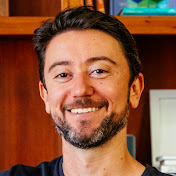
OpenAI’s Head of ChatGPT: We’re entering a new era of AI (again) | Tibo Sottiaux
Runs 24/7 with no model picker, and the only setting is which channels you talk through. It launched with one primary dot per user, and a dot warned Tibo of a ChatGPT outage five minutes before a live demo.
Dots removed the model picker; the only setting is which channels you use. Dots runs 24/7 with no model picker or reasoning-effort controls. The one thing a user configures is which channels they talk to it through.
Tibo Sottiaux says even he gets fatigued by model pickers, reasoning efforts and multi-agent options: "You kind of need a PhD in model pickers." OpenAI is cutting complexity in ChatGPT the same way, merging the chat and work toggle after feedback that people liked work's capability but sometimes wanted chat's speed.
A 24/7 agent that learns your goals replaces hand-tuned loops and graphs. Dots is built to understand goals and preferences and learn from feedback. Fiddling with loops and graphs to get good results is treated as a passing phase.
Tibo's own agent team grows with each model breakthrough, then shrinks when a better model lets one bigger agent, which keeps everything in memory, do the whole job. He calls the cycle "expansion and shrinking."
Dots aims to be one intelligence reachable from any screen, not tied to a device. The same dot could join a meeting room and take notes, then be picked up by email or text, present when needed and out of the way otherwise.
Tibo calls the laptop a brick you carry that ties you to the technology. He sees this model as the likely primary way people will talk to AI, whether or not Dots itself wins.
Ship one agent first, watch how people use it, then add more. Dots launched with a single primary dot per user, the one you text and the one that learns your preferences most deeply. Users will later add a second, third and fourth dot as a virtual team with specific roles.
Starting with one let the team see what people actually do and tune the system with the community, launching to Pro users first. Tibo already runs one dot only for monitoring Twitter, which he says is enough work for an entire dot.
Separate the harness from the machine and fence risky dots with extra monitoring. The Dots harness does not run on the user's machine, so one dot can connect to many devices. Specialist dots that touch production systems get extra guardrails and monitoring and run on their own hardware, some on Mac minis.
Tibo's dot had access to some production systems and warned him of a ChatGPT outage 5 minutes before a live demo, though it could not fix it. OpenAI also spends more compute on secondary monitoring that watches the main agent for risky actions and prompt injection.
Dots joins years of long-task and memory research to the Codex harness. Work on long, persistent tasks and on memory systems goes back more than 2 years, and Dots combines both with the Codex harness built over many months.
Dots launched on Astra, which Tibo describes as OpenAI's safest, most aligned model, with extra effort on security. Codex writes much of the code for Dots itself.
More in AI assistants
 AI assistants
OpenAI
An AI research and product company behind ChatGPT, Codex and the Dots agent.


 51 sources · 151 tips
 AI assistants
ChatGPT
OpenAI's AI assistant app used for chat, plugins and agent work.
51 sources · 102 tips AI assistants
Anthropic
An AI company that builds the Claude models and products such as Claude chat and Cowork.
 25 sources · 71 tips
 AI assistants
Claude
Anthropic's AI assistant and model family, used for chat, coding and agentic work.
 19 sources · 35 tips
 AI assistants
ElevenLabs
A voice AI company with text-to-speech, dubbing, speech-to-text and music models, plus consumer and creator apps.
 6 sources · 37 tips
 AI assistants
Gemini
Google's AI assistant app, available as a chatbot and moving toward a personal agent.
11 sources · 13 tips AI assistants
NotebookLM
A Google Labs app that answers questions about your own sources and turns them into AI-hosted audio shows.
2 sources · 18 tips AI assistants
Tolan
A voice-first AI companion app with an animated alien character that remembers your conversations.
2 sources · 17 tips