 Caddie
The bottom line
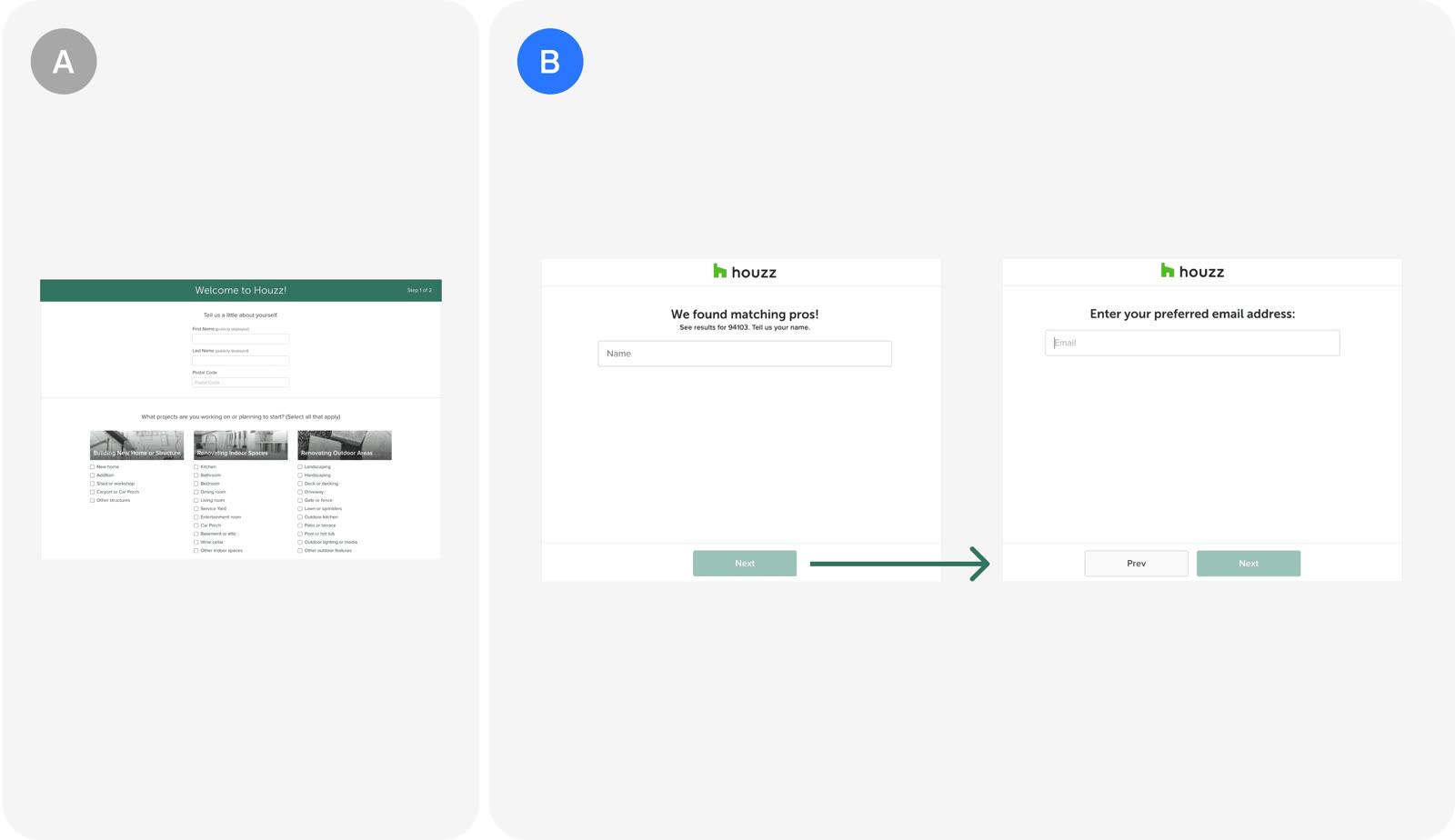
Houzz split its contact form into three screens, one each for name, email and phone number, and conversion rose by more than 15%. Breaking up data entry can beat a shorter form, even when it costs more clicks.
Key takeaways
More clicks, less thinking, more conversions
| Single form | Three screens | |
|---|---|---|
| Fields per screen | 3 | 1 |
| Screens | 1 | 3 |
| Clicks to finish | Fewer | More |
| Mental effort | Higher | Lower |
| Conversion | Baseline | +15% or more |
- Splitting contact information across three screens raised conversion by more than 15%. Each screen asks for only one thing.
- The screens cover name, email and phone number, one per screen.
- The new design trades more clicks for less mental effort. Lower cognitive load was the aim of the change.
- Completing the form takes more clicks than before.
- The test belongs to the onboarding category. It targets the first step where users hand over their details.
The test and its result
One field per screen: name, then email, then phone
Houzz replaced a single contact form with three single-field screens and saw conversion climb by over 15%.
- The new design shows name, email and phone number on separate screens.
- Each piece of information gets its own screen.
- The test was run in the Houzz app during onboarding.
- The goal was to reduce cognitive load by breaking down the entry process.
- The design accepts an increase in clicks to get there.
- The result was a conversion rate increase of more than 15%.
- More users completed the flow despite the extra steps.
- The test was first written up by Insider Growth HQ in a piece on three experiments to boost conversion.
In the growth library
Houzz, Onboarding test. Houzz split its contact form into three single-field screens (name, email, phone) instead of one combined form. Even with more clicks, conversion rose by more than 15%.
Lessons that draw on this:
More from  abtest.design · The whole library, and ask it anything