0:00Coming up, stop chasing those high traffic App Store keywords. Some of the most profitable keywords are not the ones that are getting thousands of searches a month. In fact, they're the keywords that are often overlooked and your competitors are not paying attention [music] to. Today, I'm going to show you my favorite ASO tool and how to use AI to uncover these hidden opportunities. I'm going to show you how to find them, how to evaluate their potential, and identify the keywords actually worth targeting.
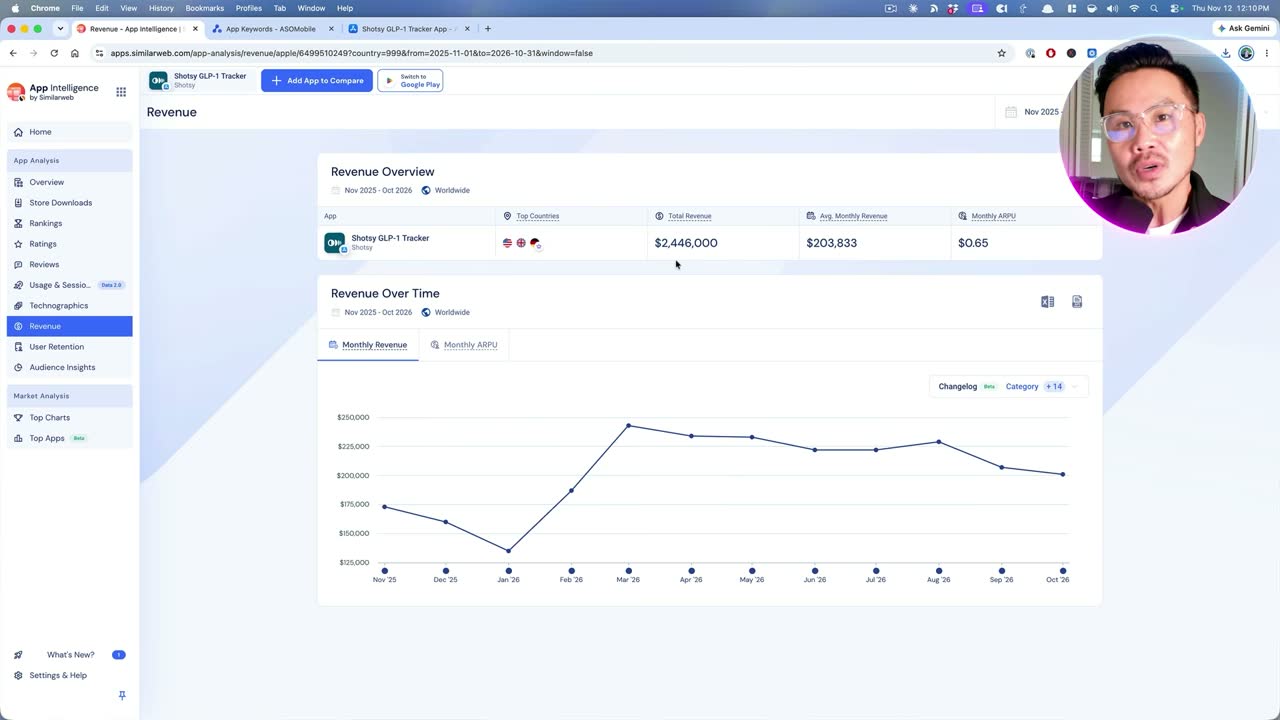
0:41Stay tuned. [music] What is up App Nation? It is Steve P. Young, founder of appmasters.com and follow me along. If you're just listening to the podcast and you're not paying attention to the video, pay attention to this video because I'm going to walk you through our entire process for finding great, high converting keywords and using AI to do most of the work. So without further ado, let's get started. Now, in a previous video that I'll link up somewhere right here into the notes, you'll find us breaking down an app called Shotzy. The app's making over $200,000 a month according to our friends at Similar Web. You can see right here are the downloads and then we can get into the sales, the revenue sales right here.
1:35So I'm just going to go the last 12 months and apply it here. So the app has made within the last 12 months over $2 million. Now, if you've been thinking about creating a GLP tracker app, I'm going to show you exactly how to find the keywords that give you the opportunity to sort of take a little bit of that GLP tracker industry pie. All right? So, here's the tool. It is called ASO Mobile. I featured them in previous videos, but I'm going to walk you through exactly how we do it. More importantly, they have a 50% offer going on right now, right now, for Black Friday that is good until November 23rd to the 29th, and you can save 50% off any of their plans. All right? So, go get that offer first, and then come back, and I'm going to show you how to find these niche keywords that Shotzy may not be focused on. All right. First and foremost, add the application. I've already done it here, but what I would
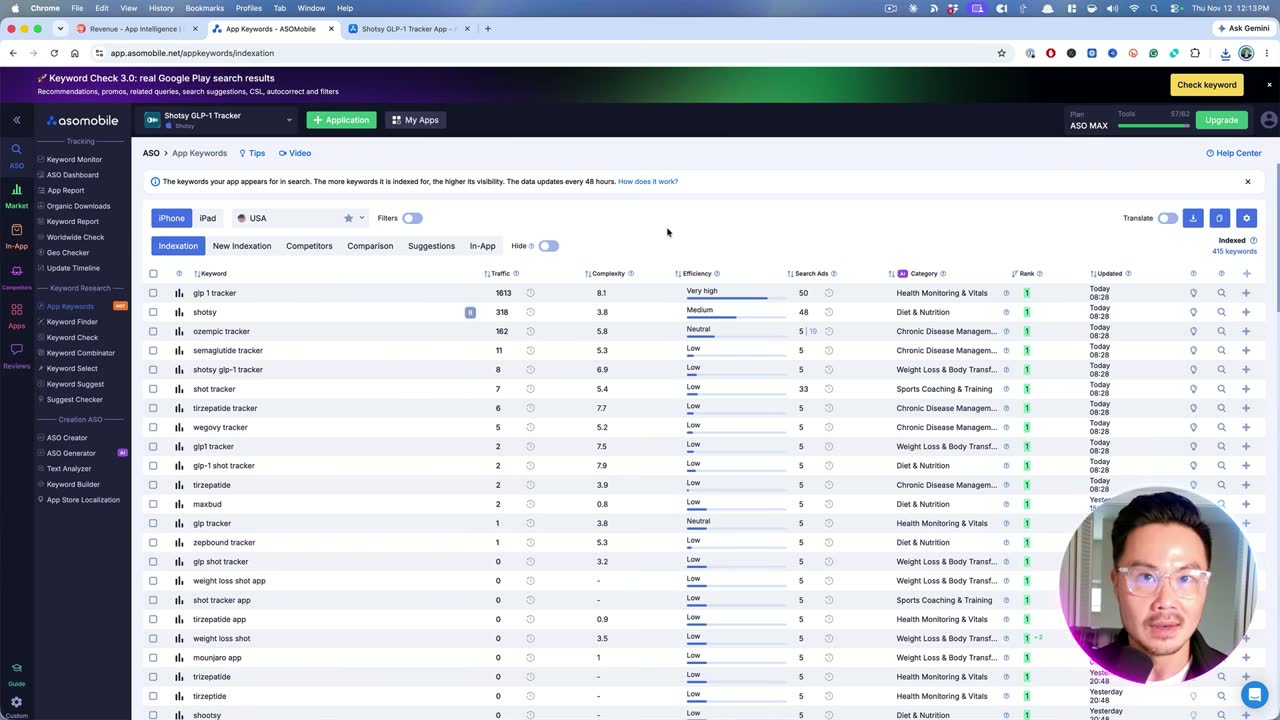
2:40do is hit this add application. The easiest way, just paste the App Store link right here. So, you can paste it like here, and then it'll find it, and you hit add, and it's right here. Done. The next thing you want to do is go to this link, app keywords. Now, these are all the keywords that Shotzy is indexed for. Because Shotzy is so big, they're probably indexed for a lot of keywords that they may not even be optimized for. So, this is a good place to start. You can also do competitors and comparison.
3:15I don't really mess around with that stuff. I just kind of stay here. Now, we're going to export this spreadsheet right here. Done. And then we're going to go to Claude to find these awesome keywords. Now, I do want to mention that ASO Mobile does have an MCP connection to Claude, and I'm going to show you how to connect all of that in an upcoming video. But if you want to go ahead and start before that video comes out, go check it out. Just go to your account right here, and then MCP API access, and then you can get an early start on keyword research and doing all your ASO within Claude. One thing I want to point out is you're like, Steve, don't all ASO tools do this? I'm like, no.
3:59Most ASO tools, you have to enter in the keywords. What I love about ASO Mobile is it tells us all the keywords, so I don't actually have to think, right? Like I don't With AI, I don't want to think that much anymore, right? So I'm going to download that spreadsheet and I want you to follow along and copy this exact prompt as you work alongside me. All right, I've got Claude opened up right here. Here's the prompt that I'm going to give it. I'm going to say, can you sift through these keywords and create a brand new spreadsheet with the most relevant keywords for this particular app? Please use the search ads column as the official traffic score. Now, why am I saying all this stuff? Is because I'm going to open up that spreadsheet that I just downloaded for Shotzy from ASO Mobile and you can see it has a traffic score, a complexity score, which is just a difficulty score, the efficiency score, and the search ad
4:55score. Now, the efficiency score is more of a calculation from ASO Mobile that shows you how relevant that keyword is and does it have traffic. So obviously GLP One Tracker, highly efficient for Shotzy. Tons of traffic and super relevant to the app, right? So I'm going to tell it take pay attention to the search ad score. Okay. Because I don't want to show off a different app, I'm going to just say for a similar app that is very similar to Shotzy, okay? So can you sift through these keywords and create a brand new spreadsheet with the most relevant keywords for a brand new app which will inform Claude on how to find these keywords very similar to Shotzy. And then I'll play here's the link to the Shotzy app.
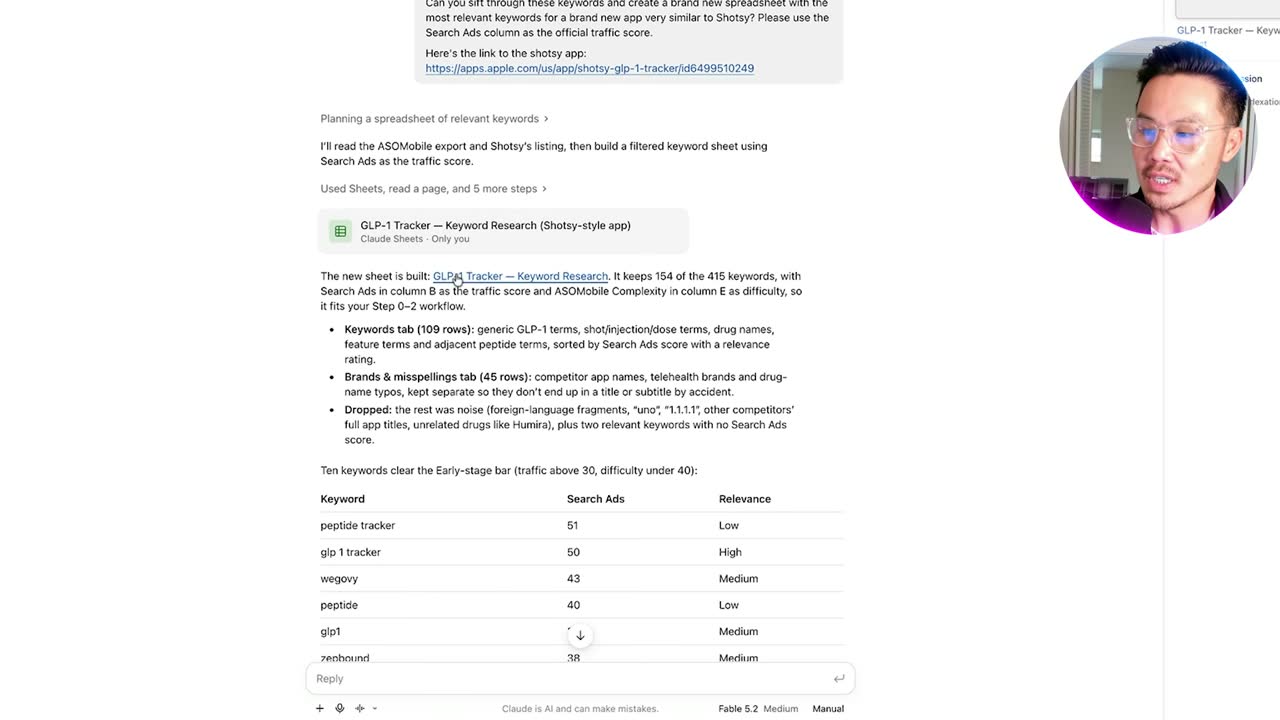
5:50And that will tell Claude to go through the description and all that stuff, right? Obviously I have to upload this spreadsheet. So I'm going to drag and drop the spreadsheet right here that I just downloaded from ASO Mobile and then hit enter. All right, here's what Claude came back with. Create a brand new spreadsheet for me that I can now use. This spreadsheet is built and then it keeps 154 of the 415 keywords. Now, because ASO Mobile is so extensive in their research, I need to decrease those number of keywords cuz a lot of them won't be relevant and also won't have the search volume that I'm looking for, right?
6:30So now because I've already trained Claude to find the right keywords, it's already starting to find the right keywords for me. So just FYI, that's a little sneak peek, but I'm going to show you if you guys have not trained Claude what prompt to use. But first off, let me download this spreadsheet or here, I'll just show it to you right here. This is the cool part, right? What Claude has done is giving me these keywords and told me these are competitor brands. So this brand new spreadsheet has a type and I can say like avoid competitor brands or put all these competitor brands keywords maybe in the Spanish Mexico keyword field, right? Usually I don't go after competitor terms, but I wanted to show off this spreadsheet because it's kind of cool to see all of it and just be able to filter off the type so we can truly train Claude to optimize our entire ASO. All right, here we go. So I'm going to do that. I'm
7:29going to close that window. All right, next I want you to use this prompt instead. So I'm going to take this and then I'm going to do this. So I'm going to say using the spreadsheet you just created, now find 6 to 10 keywords. If you've been following along, I've been saying just target 6 to 10 keywords because 6 to 10 keywords is about the limit that you can use to optimize both the US and Spanish Mexico title and subtitle, all right? The keyword fields, while important, not very necessary. And from what I've found is the keyword fields are really good for keywords that have decent traffic and very very very low competition, all right? So, I'm not going to pay attention to those to the keyword field for this video.
8:19Again, Claude will do most of the work for you in terms of spitting out the keyword field, but you really want to pay attention to your title and subtitle. Those are the keywords that are actually going to move for you. All right. Here we go. Now, here's what Claude gave back. Only one non-branded keyword meets both cutoffs, okay? So, GLP 1. So, the rest of the list is the nearest misses ordered by how close they come. Search as column is in column B in the new sheet. Okay, it was on a column E and complexity is column E cuz I told it the different columns right here.
8:53Column E, okay? So, that's I'm glad Claude was able to figure this out. Now, I've got some interesting keywords that I can go after, right? And maybe the main keyword that I'm seeing right now is going after the specific type of medication versus just being GLP 1 because I probably cannot beat GLP 1 tracker. I can't beat Shotsy, but I might be able to beat them on Wegovy or Zepbound, right? So, it gives me some indication and the complexity. Now, what I can do is ask Claude, hey, are any of the trademark drug names, do they have tracker associated with it as well?
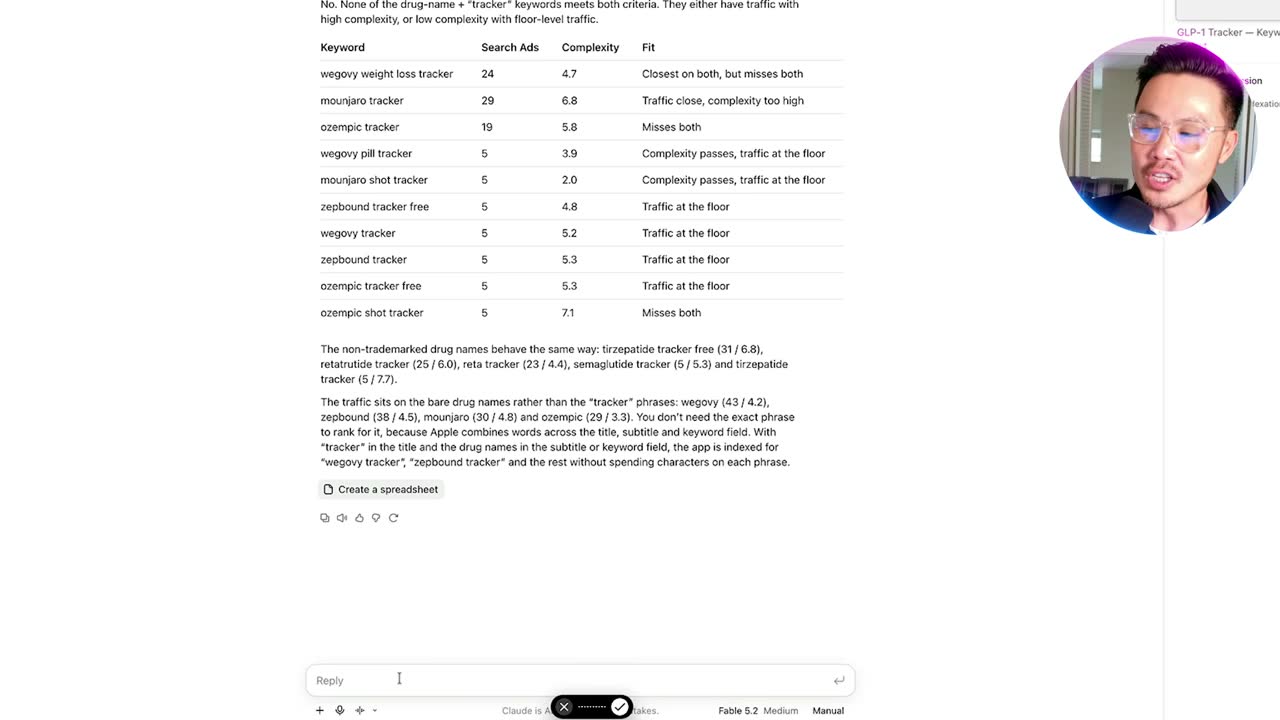
9:33Let's see. Look, says do you want me to run step one title and subtitle? So, I've already trained Claude in my projects, but I'm going to walk you through everything else. So, can you see if there are any keywords that match the criteria and also have tracker after the trademark drug names? Let's see what happens. Perfect. Now, we're starting to get somewhere. So, you can see Mounjaro tracker, Wegovy, weight loss tracker is interesting, pill tracker. These are just like lower traffic keywords that you might be able to go after.
10:16And the way I do this is sometimes I'll go after these keywords first, Zap pound tracker free, which is five traffic score to help me get to a higher ranking for Zap pound, right? So this gives me some indication and I might start off with Wegovy because it has a little bit of traffic, Wegovy weight loss tracker, and then hopefully end up going after Wegovy itself. And then Wegovy weight loss tracker is already here. So that's what I would do right now.
10:45Now the next thing I want to show is let's say we are going after this keyword, Wegovy weight loss tracker, right? So I'm going to search for it in ASO Mobile and then I'm going to click here, the keyword search. So I clicked for those who are listening, I clicked the magnifier right here. Now I can also click this plus icon and I will do that. Eventually you want to add your app to this, right? But here's a way to start monitoring.
11:11Again, for my keyword monitoring right here with an ASO Mobile you can do all of it, keyword monitoring. You can see how well it ranks for this particular keyword. I only have a small number of keywords because for me I want to stay completely focused and I want to really pay attention to the keywords that I believe I can get to number one, right? So I only have a few. I don't like to have hundreds because it just it's too much information for me. All right. Let's go back to this.
11:43The next thing to pay attention to, so now we search for that particular keyword, right? Wegovy weight loss tracker, you can see the actual search results now. And what I'm really looking for is who has that particular brand name in their title? So what you can see here is it says Wegovy weight loss tracker. Now it's a fairly long keyword, right? So what you could do is just say Wegovy tracker in the and then weightwegovy weight loss tracker as the Spanish Mexico title, right? So we're going to tell Claude to do just that because I feel like it is a keyword I can actually go after, right?
12:28So let's do that. I'm going to tell Claude I'm just going to talk to it, right? Tired of everything else. Can you optimize the US title for wegovy tracker and then optimize the Spanish Mexico title just calling it wegovy weight loss tracker. The app name is called shot me and then using the data figure out what keywords should belong in the subtitle and keyword field. Bunch of rambling. Let's see what Claude comes up with. All right. Let's see what Claude came back with. Shot me is the app name. They got that right. So they added GLP-1 tracker.
13:09They know that it's 30 character limit. Zepbound, Mounjaro, and Ozempic, great. GLP-1. I like this, right? Because I have found that having these keywords left I've already trained Claude to put the most important keywords to the left of the keyword field. So it's already done that. Shot me again wegovy weight loss. What I wanted was to lose the brand name so I'm going to tell Claude to fix that and then GLP-1 shock and So great keywords, right? The Spanish Mexico subtitle is GLP-1, space GLP space one, shot an injection tracker, pretty interesting.
13:46And it'll tell me all the different scores. Done. And then it always asks me hey has the ASO been approved and submitted to the App Store? Now be careful when you're using other brands in your title and subtitle because they might throw a fit for it. The way I like to do it is to try to hide it in the Spanish Mexico localization. So if you just wanted to be, you know, you wanted to play it safe and call it GLP-1 tracker, that's fine, but just make sure that your Spanish Mexico has the exact keyword that we're going after. So, now I'm going to tell Claude to update the Spanish Mexico title to Wegovy weight loss tracker so that it is the exact match without the brand without the app name. Done.
14:31Perfect. That's what I like to do when I'm really going all in on a particular keyword and phrase. But wait, that's not all. I want to show you some other cool features of ASO Mobile. Now, obviously, you can go into the keyword monitoring, right? And add the keywords. So, once you've added your app and now you're really paying attention to the keywords, you can also look at the ASO dashboard just to see how well you're indexing from a keyword perspective, right? The more the better, the more keywords you're indexed for, the likelihood you're going to start ranking higher for a lot more keywords, right?
15:12The other thing is if you're doing competitor analysis, one of my favorite things to look at is the update timeline, right? So, you can see the version right here that was released on September 15th for Shotzy. Here's some of the changes they made. So, they added this new drug and that might be an interesting keyword now that we can go after. So, I'm not even going to Foundeo, I think, right? So, that's interesting. Did they change their screenshots? Nope, that looks good.
15:42Right? And then you can always see what changed versus the other. It looks like there's nothing too much on this November 8th change right here. Okay? So, really cool and then you can change the dates if you want to see older updates. You can see if they're doing any in-app events. So, it looks like there is one and here are some competitors that ASO Mobile already put in for me. So, me again, nothing nothing, nothing. So, only Shotzy's doing in-app events right now. And in-app events are great ways to try to hopefully get more keywords to index, All All right, the last thing I want to show you, I just checked you the US localization, but under app keywords, you can go to Germany, for example, and you can pick any country and France, Spanish, Spain.
16:33I like Germany. It's a good market to go after. And I'm selling their shot see, so I can see all the German related keywords. Again, I can do the same process that I just did now localizing for the German market. All right, guys, that is it. I'm going to create another video where I connect ASO Mobile to Claude so that I can do everything within Claude itself. So that's our entire ASO workflow that you want to pay attention to. And to make sure that you don't miss that video, make sure you [music] hit subscribe. And lastly, go check out asomobile.net.
17:13They have a 50% offer right now until Sunday, November 29th. [music] All right? Go check it out. It is a great tool and I highly, highly recommend that you take advantage of that 50% Black Friday offer. No, it is not going to be cheaper on Cyber Monday. So go sign up before November 29th. All right, if you had any questions, what I'm going to do is create a PDF that walks you through that entire instructions with the prompts so that you can just easily copy and paste it for your own workflow. No email required, and that link is in the description. Once again, thank you to my friends at ASO Mobile. Go check out that 50% offer. By the way, no coupon code needed. Just go to asomobile.net and you'll see the 50% offer.
18:08All right. Now I'll see you on the next video.
 Caddie
 App Masters · The whole library, and ask it anything